Saturday, March 29, 2014

Migrating to SQLCipher for Android 3.x

In my last post I wrote why you have seriously consider upgrading to SQLCipher for Android 3.0.2. Version 3.x introduced new default configuration that is not out-of-the-box compatible with databases created with previous versions (1.x/2.x). Particularly, the default key derivation function's (KDF) iteration count increased from 4000 to 64000 (yes, x16), and therefore some kind of migration of the current database required.

You won't be able to open the existing database file if you'll try to upgrade the SQLCipher libraries without migrating it (the database file) first. The following error will be thrown in attempt to open existing database:
03-29 16:14:04.199  18107-18107/info.osom.sqlciphertest I/Database? sqlite returned: error code = 26, msg = file is encrypted or is not a database
03-29 16:14:04.199  18107-18107/info.osom.sqlciphertest E/Database? CREATE TABLE android_metadata failed
03-29 16:14:04.199  18107-18107/info.osom.sqlciphertest E/Database? Failed to setLocale() when constructing, closing the database
    net.sqlcipher.database.SQLiteException: file is encrypted or is not a database
            at net.sqlcipher.database.SQLiteDatabase.native_setLocale(Native Method)
            at net.sqlcipher.database.SQLiteDatabase.setLocale(SQLiteDatabase.java:2092)
            at net.sqlcipher.database.SQLiteDatabase.(SQLiteDatabase.java:1958)
            at net.sqlcipher.database.SQLiteDatabase.openDatabase(SQLiteDatabase.java:875)
            at net.sqlcipher.database.SQLiteDatabase.openOrCreateDatabase(SQLiteDatabase.java:907)
            at net.sqlcipher.database.SQLiteOpenHelper.getWritableDatabase(SQLiteOpenHelper.java:132)
            at net.sqlcipher.database.SQLiteOpenHelper.getWritableDatabase(SQLiteOpenHelper.java:99)
            at info.osom.sqlciphertest.MainActivity$PlaceholderFragment$1.onClick(MainActivity.java:69)
            at android.view.View.performClick(View.java:4202)
            at android.view.View$PerformClick.run(View.java:17340)
            at android.os.Handler.handleCallback(Handler.java:725)
            at android.os.Handler.dispatchMessage(Handler.java:92)
            at android.os.Looper.loop(Looper.java:137)
            at android.app.ActivityThread.main(ActivityThread.java:5039)
            at java.lang.reflect.Method.invokeNative(Native Method)
            at java.lang.reflect.Method.invoke(Method.java:511)
            at com.android.internal.os.ZygoteInit$MethodAndArgsCaller.run(ZygoteInit.java:793)
            at com.android.internal.os.ZygoteInit.main(ZygoteInit.java:560)
            at dalvik.system.NativeStart.main(Native Method)

Saturday, March 22, 2014

Why you should upgrade SQLCipher to latest (3.0.2) version

If you're using SQLCipher (for Android) version <= 3.0.1, then your application may potentially leak sensitive data into the log system. That's because in case of error in its underlying native library, the (SQLCipher) Android wrapper library was printing the original query values into the log system.
This issue was fixed on February 1st, 2014 and integrated in version 3.0.2.

I'm including here a short demo that demonstrates the problem.

I've created a new basic project using Android Studio. Then downloaded SQLCipher for Android version 2.2.1, unzipped and added all the content to the project. This is the structure:


Monday, February 10, 2014

Guarding enumeration classes from ProGuard

During my application tests I received exception with the following call stack:
02-09 15:18:06.478 26166 26403 E TAG: Caused by: java.lang.NullPointerException
02-09 15:18:06.478 26166 26403 E TAG:   at java.lang.Enum$1.create(Enum.java:43)
02-09 15:18:06.478 26166 26403 E TAG:   at java.lang.Enum$1.create(Enum.java:35)
02-09 15:18:06.478 26166 26403 E TAG:   at libcore.util.BasicLruCache.get(BasicLruCache.java:54)
02-09 15:18:06.478 26166 26403 E TAG:   at java.lang.Enum.getSharedConstants(Enum.java:209)
02-09 15:18:06.478 26166 26403 E TAG:   at java.util.EnumSet.noneOf(EnumSet.java:48)
02-09 15:18:06.478 26166 26403 E TAG:   at af.a(SourceFile:115)
The exception occurred only in release version, while in debug everything worked fine. So I immediately suspected that ProGuard, whose processing is part of a release build, is somehow involved here.

From ProGuard's documentation:
If your application, applet, servlet, library, etc., contains enumeration classes, you'll have to preserve some special methods. Enumerations were introduced in Java 5. The java compiler translates enumerations into classes with a special structure. Notably, the classes contain implementations of some static methods that the run-time environment accesses by introspection (Isn't that just grand? Introspection is the self-modifying code of a new generation). You have to specify these explicitly, to make sure they aren't removed or obfuscated: 
-keepclassmembers,allowoptimization enum * {
      public static **[] values();
      public static ** valueOf(java.lang.String);
}
OK, problem found: I just need to add this 'keepclassmembers' exception in ProGuard project configuration file.

But what are values() and valueof(java.lang.String) needed for? I still was curious how exactly I received NullPointerException in java.lang.Enum entrails. Let's better understand it.

Monday, February 3, 2014

Programmatically filtering your application's logs from Logcat output

Note: this post discusses filtering Logcat output on devices running Android prior to version 4.1. Starting from Android 4.1 applications are allowed to read only their own logs.

Logcat isn't much convenient when it comes to filtering your application logs. In fact, if you look at the logcat documentation, you will find that you can filter logcat output only by priority and/or tag fields:
A filter expression follows this format tag:priority ..., where tag indicates the tag of interest and priority indicates the minimum level of priority to report for that tag. Messages for that tag at or above the specified priority are written to the log. You can supply any number of tag:priority specifications in a single filter expression. The series of specifications is whitespace-delimited.
The android.util.Log class is your interface for printing your application logs to the Logcat system. Common print statement looks like this:
Log.e(TAG, "something bad happened");
Invoked method specifies the priority of the log record - in this example e stands for error, and TAG specifies well.. the tag.
 I commonly set the class name as a TAG using this statement:
private static final String TAG = ClassName.class.getCanonicalName();
Resolving the class name at run-time allows me to stay flexible and be adjusted to all the obfuscations made by Proguard processing.

But here's a problem: given a project with a hundred classes, how would you filter Logcat's output to print just your application's logs?

Saturday, February 1, 2014

Solving errors in Android Studio's new project creation

The other day I upgraded my Android Studio bundle to latest stable version: android-studio-bundle-132.893413-windows.

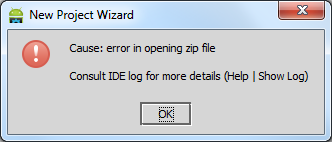
Shortly afterwards, I noticed that each time I tried to create a new project, it ended with the following error message:
Cause: error in opening zip file. Consult IDE log for more details (Help | Show Log)


Hmmmm.. which error file exactly and what's wrong with it?

Saturday, July 13, 2013

Exporting Google Chrome's page load metrics

Google Chrome offers a rich functionality as it comes to a developer productivity. Pressing F12 opens the developer tools window with eight panels of tools, allowing you to inspect DOM elements and styles, various resources (DB, cookies, appcache, local storage, etc) and network statistics; debug JavaScript code; running commands in the shell console and many more.


Recently, I've been experimenting with several network configurations, and wanted to log page load in order to do a benchmark later on. At the very least, I wanted to log each page load - how much time in total it took to load the page. The Network panel in developer tools provides that information for a view only (can be found in the very bottom of the page).

Saturday, July 7, 2012

Keylogging with Win32 Hooks

Keylogger (from Wikipedia):
Keystroke logging is the action of tracking (or logging) the keys struck on a keyboard, typically in a covert manner so that the person using the keyboard is unaware that their actions are being monitored.

It may seem strange, but there're many keylogging methods. People are getting more inventive as it comes to obtaining other people's secrets.
Protecting your secrets becomes challenging task. Even more than you can think of. Depending on your level of paranoia, perhaps you have to make sure that:
  • you're not using wireless keyboards
  • your keyboard installed directly into computer, and that there's no external device attached in between
  • you're using silent keyboard for preventing acoustic cryptanalysis attacks, and if you don't have one - you have to install random keypress sound generating machine
And I didn't even mention software-based threats!

Typical keylogger paranoid
Read the following excellent article, written by Nikolay Grebennikov, current CTO of Kaspersky Lab, where he outlines keylogger history including several publicized keylogging incidents.