Added support for Java 7 language features like multi-catch, try-with-resources, and the diamond operator. These features require version 19 or higher of the Build Tools. Try-with-resources requires minSdkVersion 19; the rest of the new language features require minSdkVersion 8 or higher.My colleague told me that neither Lint nor compiler haven't warned about that, which was strange - since I vividly remember they both did in the past. Bug in Lint could explain that, but how did it compile? We decided to review our assumptions.
Saturday, October 5, 2019
Try-with-resources desugaring support in Android's build tools
During one of the code reviews with my colleague I've noticed he used try-with-resources Java 7's feature. To my then latest knowledge, try-with-resources required minSdkVersion 19 (while our app's minSdkVersion is 16) - which is based on the following statement (see under SDK Tools, Revision 22.6 (March 2014)):

Saturday, June 8, 2019
Verifying 64-bit libraries are being loaded
If you're bundling native libraries inside your Android application, then you've probably already know that starting August 1, 2019, your apps published on Google Play will need to support 64-bit architectures. In this post I'll show how we can explicitly choose the 64-bit ABIs to run, and verify that the 64-bit library was indeed loaded at runtime.
The support 64-bit architectures guide provides a command for selecting which ABI libraries to use during the APK installation process:
This command can be handy when your APK includes several ABI libraries, your CPU able to run multiple ABIs and you want to explicitly specify which ABI to use.
The support 64-bit architectures guide provides a command for selecting which ABI libraries to use during the APK installation process:
# A successful install:
$ adb install --abi armeabi-v7a APK_FILE.apk
Success
This command can be handy when your APK includes several ABI libraries, your CPU able to run multiple ABIs and you want to explicitly specify which ABI to use.
Sunday, July 12, 2015
How to manually create Android emulator's internal storage disk image
Built-in AVD Manager incorrectly generates (internal storage) disk images when you're creating new virtual device targeting API 19 or greater.
On API 19 - no matter what size you specify during the virtual device configuration, the maximum that you're going to get is 200mb. On API 21 and 22, the maximum size increased to 550mb. This issue already has appropriate question on StackOverflow and AOSP bug report.
For average application this will be sufficient, but for large application (or when you need to install several application that talk to each other) it can be problematic.
On API 19 - no matter what size you specify during the virtual device configuration, the maximum that you're going to get is 200mb. On API 21 and 22, the maximum size increased to 550mb. This issue already has appropriate question on StackOverflow and AOSP bug report.
For average application this will be sufficient, but for large application (or when you need to install several application that talk to each other) it can be problematic.
Thursday, April 23, 2015
Commons Codec on Android
If your application depends on Commons Codec library (version 1.4 and above), and you are not aware that Android framework already includes this library, then there's a chance that your application will crash with a runtime exception.
Why does the Android framework includes the Commons Codec library?
Android framework shipped with HttpClient (version 4.0 pre-BETA, an ancient 2008 release). HttpClient depends on Commons Codec. Therefore, AOSP had to include Commons Codec as well.
OK, so can I use framework's Commons Codec library in my application?
Unfortunately no. This API is hidden and not exposed in Android SDK for application developers. You can invoke the library's classes using reflection of course, but by doing so you take the risk of relying on undocumented APIs, which is not recommended at all.
Why does the Android framework includes the Commons Codec library?
Android framework shipped with HttpClient (version 4.0 pre-BETA, an ancient 2008 release). HttpClient depends on Commons Codec. Therefore, AOSP had to include Commons Codec as well.
OK, so can I use framework's Commons Codec library in my application?
Unfortunately no. This API is hidden and not exposed in Android SDK for application developers. You can invoke the library's classes using reflection of course, but by doing so you take the risk of relying on undocumented APIs, which is not recommended at all.
Saturday, December 6, 2014
Too many methods in main-dex?
Notes:
1. The content of this post is relevant only if your minSdk < 21. On Lollipop, no ClassLoader patching required.
2. This solution worked for me well, but it might not work for you in the same way. So please use it on your own risk. Nevertheless, I would be happy to know of your problems - so please post in comments!
Right after the release of multidex support we removed our custom solutions (for 64k methods problem) in favor of multidex support library. Gradle for Android plugin v0.14.0+ simplified the process even more - it implemented all the manual tasks (I wrote about some of them in my previous post) that we had to do previously.
Lately we encountered another issue: we have reached the 64k methods limit in main dex as well. It comes in form of the following error when we're building our project:
Well, you are quite right, and we're thinking hard on how to split various features of our application into separate apps. But for short-term, we had to find a solution for this specific issue.
1. The content of this post is relevant only if your minSdk < 21. On Lollipop, no ClassLoader patching required.
2. This solution worked for me well, but it might not work for you in the same way. So please use it on your own risk. Nevertheless, I would be happy to know of your problems - so please post in comments!
Right after the release of multidex support we removed our custom solutions (for 64k methods problem) in favor of multidex support library. Gradle for Android plugin v0.14.0+ simplified the process even more - it implemented all the manual tasks (I wrote about some of them in my previous post) that we had to do previously.
Lately we encountered another issue: we have reached the 64k methods limit in main dex as well. It comes in form of the following error when we're building our project:
UNEXPECTED TOP-LEVEL EXCEPTION:You can say: man, something is wrong with your design if you're having such a problem!
com.android.dex.DexException: Too many classes in --main-dex-list, main dex capacity exceeded
at com.android.dx.command.dexer.Main.processAllFiles(Main.java:494)
at com.android.dx.command.dexer.Main.runMultiDex(Main.java:332)
at com.android.dx.command.dexer.Main.run(Main.java:243)
at com.android.dx.command.dexer.Main.main(Main.java:214)
at com.android.dx.command.Main.main(Main.java:106)
Well, you are quite right, and we're thinking hard on how to split various features of our application into separate apps. But for short-term, we had to find a solution for this specific issue.
Friday, October 24, 2014
Generating main-dex-list file
[Update - 10/31/2014] Gradle plugin v0.14.0 for Android adds support for Multi-Dex. Everything that is written below is now done automatically. All you need to do is to add this line in your build.gradle file:
android {
defaultConfig {
...
multiDexEnabled = true
}
In my previous post I described the 65536 methods issue and how to solve it using multi-dex technique. In overall, this solution is pretty straightforward - you tell dx to operate in multi-dex mode, and add the multi-dex support library to patch the ClassLoader on application start-up.
android {
defaultConfig {
...
multiDexEnabled = true
}
In my previous post I described the 65536 methods issue and how to solve it using multi-dex technique. In overall, this solution is pretty straightforward - you tell dx to operate in multi-dex mode, and add the multi-dex support library to patch the ClassLoader on application start-up.
The only tricky part is the main-dex-list file that specifies all the classes that you want to be included in the main dex file. dx takes this file as a parameter and generates appropriate dex files.
Failing to keep required classes in the main dex file will produce the following runtime exception:
java.lang.RuntimeException: Unable to instantiate application info.osom.multidex2.Application: java.lang.ClassNotFoundException: Didn't find class "info.osom.multidex2.Application" on path: DexPathList[[zip file "/data/app/info.osom.multidex2-1.apk"],nativeLibraryDirectories=[/data/app-lib/info.osom.multidex2-1, /vendor/lib, /system/lib]]Now, you may ask, which exact classes should be included in main dex file? And if I have many classes, do I need to write all those class names by hand?
..
Caused by: java.lang.ClassNotFoundException: Didn't find class "info.osom.multidex2.Application" on path: DexPathList[[zip file "/data/app/info.osom.multidex2-1.apk"],nativeLibraryDirectories=[/data/app-lib/info.osom.multidex2-1, /vendor/lib, /system/lib]]
at dalvik.system.BaseDexClassLoader.findClass(BaseDexClassLoader.java:56)
at java.lang.ClassLoader.loadClass(ClassLoader.java:497)
at java.lang.ClassLoader.loadClass(ClassLoader.java:457)
Saturday, October 4, 2014
Multi-dex to rescue from the infamous 65536 methods limit
You landed on this page because you've probably received the following stack trace when you tried to build your Android project:
UNEXPECTED TOP-LEVEL EXCEPTION:or this stack trace if you're using dx version 1.8 (shipped with SDK build tools 19.0 and above):
java.lang.IllegalArgumentException: method ID not in [0, 0xffff]: 65536
at com.android.dx.merge.DexMerger$6.updateIndex(DexMerger.java:501)
at com.android.dx.merge.DexMerger$IdMerger.mergeSorted(DexMerger.java:282)
at com.android.dx.merge.DexMerger.mergeMethodIds(DexMerger.java:490)
at com.android.dx.merge.DexMerger.mergeDexes(DexMerger.java:167)
at com.android.dx.merge.DexMerger.merge(DexMerger.java:188)
at com.android.dx.command.dexer.Main.mergeLibraryDexBuffers(Main.java:439)
at com.android.dx.command.dexer.Main.runMonoDex(Main.java:287)
at com.android.dx.command.dexer.Main.run(Main.java:230)
at com.android.dx.command.dexer.Main.main(Main.java:199)
at com.android.dx.command.Main.main(Main.java:103)
trouble writing output: Too many method references: [num of methods]; max is 65536.If this is the first time you see this message, then you'll be surprised to know that Dalvik bytecode has a fundamental limitation which allows to invoke a maximum of 2^16 (65536) methods (per dex file). One glance on a list of StackOverflow questions on this topic is enough to realize how painful this limitation for us.
You may try using --multi-dex option.
Friday, September 19, 2014
Managing started service's lifecycle efficiently
So you decided to run your time-consuming operation in service component because you want to ensure that it will continue to run even if the user interface is no longer visible. You chose to extend Service, rather than IntentService because you want your service to handle multiple requests in parallel. In this post I will share a few tips for implementing your service slightly more efficiently.
Saturday, July 19, 2014
Symmetric encryption issue in Android 4.3
About a year ago, a bit after 4.3 release, I had to fix an error in one of my applications. I patched it then, but wished to return and understand better the underlying reason. The other day I came back to this code and dug a little deeper. This post is about what I found.
In one of my applications I use symmetric-key algorithm for encryption and decryption of data. Nothing fancy here, just a standard Java APIs everyone uses for such things.
In one of my applications I use symmetric-key algorithm for encryption and decryption of data. Nothing fancy here, just a standard Java APIs everyone uses for such things.
Saturday, March 29, 2014
Migrating to SQLCipher for Android 3.x
In my last post I wrote why you have seriously consider upgrading to SQLCipher for Android 3.0.2. Version 3.x introduced new default configuration that is not out-of-the-box compatible with databases created with previous versions (1.x/2.x). Particularly, the default key derivation function's (KDF) iteration count increased from 4000 to 64000 (yes, x16), and therefore some kind of migration of the current database required.
You won't be able to open the existing database file if you'll try to upgrade the SQLCipher libraries without migrating it (the database file) first. The following error will be thrown in attempt to open existing database:
You won't be able to open the existing database file if you'll try to upgrade the SQLCipher libraries without migrating it (the database file) first. The following error will be thrown in attempt to open existing database:
03-29 16:14:04.199 18107-18107/info.osom.sqlciphertest I/Database? sqlite returned: error code = 26, msg = file is encrypted or is not a database
03-29 16:14:04.199 18107-18107/info.osom.sqlciphertest E/Database? CREATE TABLE android_metadata failed
03-29 16:14:04.199 18107-18107/info.osom.sqlciphertest E/Database? Failed to setLocale() when constructing, closing the database
net.sqlcipher.database.SQLiteException: file is encrypted or is not a database
at net.sqlcipher.database.SQLiteDatabase.native_setLocale(Native Method)
at net.sqlcipher.database.SQLiteDatabase.setLocale(SQLiteDatabase.java:2092)
at net.sqlcipher.database.SQLiteDatabase.(SQLiteDatabase.java:1958)
at net.sqlcipher.database.SQLiteDatabase.openDatabase(SQLiteDatabase.java:875)
at net.sqlcipher.database.SQLiteDatabase.openOrCreateDatabase(SQLiteDatabase.java:907)
at net.sqlcipher.database.SQLiteOpenHelper.getWritableDatabase(SQLiteOpenHelper.java:132)
at net.sqlcipher.database.SQLiteOpenHelper.getWritableDatabase(SQLiteOpenHelper.java:99)
at info.osom.sqlciphertest.MainActivity$PlaceholderFragment$1.onClick(MainActivity.java:69)
at android.view.View.performClick(View.java:4202)
at android.view.View$PerformClick.run(View.java:17340)
at android.os.Handler.handleCallback(Handler.java:725)
at android.os.Handler.dispatchMessage(Handler.java:92)
at android.os.Looper.loop(Looper.java:137)
at android.app.ActivityThread.main(ActivityThread.java:5039)
at java.lang.reflect.Method.invokeNative(Native Method)
at java.lang.reflect.Method.invoke(Method.java:511)
at com.android.internal.os.ZygoteInit$MethodAndArgsCaller.run(ZygoteInit.java:793)
at com.android.internal.os.ZygoteInit.main(ZygoteInit.java:560)
at dalvik.system.NativeStart.main(Native Method)
Saturday, March 22, 2014
Why you should upgrade SQLCipher to latest (3.0.2) version
If you're using SQLCipher (for Android) version <= 3.0.1, then your application may potentially leak sensitive data into the log system. That's because in case of error in its underlying native library, the (SQLCipher) Android wrapper library was printing the original query values into the log system.
This issue was fixed on February 1st, 2014 and integrated in version 3.0.2.
I'm including here a short demo that demonstrates the problem.
I've created a new basic project using Android Studio. Then downloaded SQLCipher for Android version 2.2.1, unzipped and added all the content to the project. This is the structure:

This issue was fixed on February 1st, 2014 and integrated in version 3.0.2.
I'm including here a short demo that demonstrates the problem.
I've created a new basic project using Android Studio. Then downloaded SQLCipher for Android version 2.2.1, unzipped and added all the content to the project. This is the structure:
Monday, February 10, 2014
Guarding enumeration classes from ProGuard
During my application tests I received exception with the following call stack:
From ProGuard's documentation:
But what are values() and valueof(java.lang.String) needed for? I still was curious how exactly I received NullPointerException in java.lang.Enum entrails. Let's better understand it.
02-09 15:18:06.478 26166 26403 E TAG: Caused by: java.lang.NullPointerExceptionThe exception occurred only in release version, while in debug everything worked fine. So I immediately suspected that ProGuard, whose processing is part of a release build, is somehow involved here.
02-09 15:18:06.478 26166 26403 E TAG: at java.lang.Enum$1.create(Enum.java:43)
02-09 15:18:06.478 26166 26403 E TAG: at java.lang.Enum$1.create(Enum.java:35)
02-09 15:18:06.478 26166 26403 E TAG: at libcore.util.BasicLruCache.get(BasicLruCache.java:54)
02-09 15:18:06.478 26166 26403 E TAG: at java.lang.Enum.getSharedConstants(Enum.java: 209)
02-09 15:18:06.478 26166 26403 E TAG: at java.util.EnumSet.noneOf(EnumSet.java:48)
02-09 15:18:06.478 26166 26403 E TAG: at af.a(SourceFile:115)
From ProGuard's documentation:
If your application, applet, servlet, library, etc., contains enumeration classes, you'll have to preserve some special methods. Enumerations were introduced in Java 5. The java compiler translates enumerations into classes with a special structure. Notably, the classes contain implementations of some static methods that the run-time environment accesses by introspection (Isn't that just grand? Introspection is the self-modifying code of a new generation). You have to specify these explicitly, to make sure they aren't removed or obfuscated:
-keepclassmembers,allowoptimization enum * {OK, problem found: I just need to add this 'keepclassmembers' exception in ProGuard project configuration file.
public static **[] values();
public static ** valueOf(java.lang.String);
}
But what are values() and valueof(java.lang.String) needed for? I still was curious how exactly I received NullPointerException in java.lang.Enum entrails. Let's better understand it.
Monday, February 3, 2014
Programmatically filtering your application's logs from Logcat output
Note: this post discusses filtering Logcat output on devices running Android prior to version 4.1. Starting from Android 4.1 applications are allowed to read only their own logs.
Logcat isn't much convenient when it comes to filtering your application logs. In fact, if you look at the logcat documentation, you will find that you can filter logcat output only by priority and/or tag fields:
I commonly set the class name as a TAG using this statement:
But here's a problem: given a project with a hundred classes, how would you filter Logcat's output to print just your application's logs?
Logcat isn't much convenient when it comes to filtering your application logs. In fact, if you look at the logcat documentation, you will find that you can filter logcat output only by priority and/or tag fields:
A filter expression follows this format tag:priority ..., where tag indicates the tag of interest and priority indicates the minimum level of priority to report for that tag. Messages for that tag at or above the specified priority are written to the log. You can supply any number of tag:priority specifications in a single filter expression. The series of specifications is whitespace-delimited.The android.util.Log class is your interface for printing your application logs to the Logcat system. Common print statement looks like this:
Log.e(TAG, "something bad happened");Invoked method specifies the priority of the log record - in this example e stands for error, and TAG specifies well.. the tag.
I commonly set the class name as a TAG using this statement:
private static final String TAG = ClassName.class.getCanonicalName();Resolving the class name at run-time allows me to stay flexible and be adjusted to all the obfuscations made by Proguard processing.
But here's a problem: given a project with a hundred classes, how would you filter Logcat's output to print just your application's logs?
Saturday, February 1, 2014
Solving errors in Android Studio's new project creation
The other day I upgraded my Android Studio bundle to latest stable version: android-studio-bundle-132.893413-windows.
Shortly afterwards, I noticed that each time I tried to create a new project, it ended with the following error message:
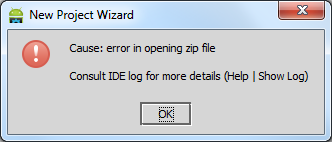
Hmmmm.. which error file exactly and what's wrong with it?
Shortly afterwards, I noticed that each time I tried to create a new project, it ended with the following error message:
Cause: error in opening zip file. Consult IDE log for more details (Help | Show Log)
Hmmmm.. which error file exactly and what's wrong with it?
Saturday, July 13, 2013
Exporting Google Chrome's page load metrics
Google Chrome offers a rich functionality as it comes to a developer productivity. Pressing F12 opens the developer tools window with eight panels of tools, allowing you to inspect DOM elements and styles, various resources (DB, cookies, appcache, local storage, etc) and network statistics; debug JavaScript code; running commands in the shell console and many more.

Recently, I've been experimenting with several network configurations, and wanted to log page load in order to do a benchmark later on. At the very least, I wanted to log each page load - how much time in total it took to load the page. The Network panel in developer tools provides that information for a view only (can be found in the very bottom of the page).
Recently, I've been experimenting with several network configurations, and wanted to log page load in order to do a benchmark later on. At the very least, I wanted to log each page load - how much time in total it took to load the page. The Network panel in developer tools provides that information for a view only (can be found in the very bottom of the page).
Saturday, July 7, 2012
Keylogging with Win32 Hooks
Keylogger (from Wikipedia):
It may seem strange, but there're many keylogging methods. People are getting more inventive as it comes to obtaining other people's secrets.
Protecting your secrets becomes challenging task. Even more than you can think of. Depending on your level of paranoia, perhaps you have to make sure that:
Keystroke logging is the action of tracking (or logging) the keys struck on a keyboard, typically in a covert manner so that the person using the keyboard is unaware that their actions are being monitored.
It may seem strange, but there're many keylogging methods. People are getting more inventive as it comes to obtaining other people's secrets.
Protecting your secrets becomes challenging task. Even more than you can think of. Depending on your level of paranoia, perhaps you have to make sure that:
- you're not using wireless keyboards
- your keyboard installed directly into computer, and that there's no external device attached in between
- you're using silent keyboard for preventing acoustic cryptanalysis attacks, and if you don't have one - you have to install random keypress sound generating machine
And I didn't even mention software-based threats!
 |
| Typical keylogger paranoid |
Read the following excellent article, written by Nikolay Grebennikov, current CTO of Kaspersky Lab, where he outlines keylogger history including several publicized keylogging incidents.
Monday, April 30, 2012
Simple Structured Exception Handling (SEH) Exploit Example
In this post I will demonstrate how to exploit Structured Exception Handling (SEH) buffer overflow vulnerability on x86 systems.
What is Structured Exception Handling and how it works?
Microsoft's Structured Exception Handling is a mechanism for handling hardware and software exceptions (both system and user defined), which allows recovering from errors and perform cleanup if necessary instead of terminating a program immediately.
The SEH represented as a linked list, whose records are stored on the stack. To ease access to this SEH chain, its head pointer maintained in Win32 Thread Information Block (TIB) structure. The TIB structure stores information about currently running thread. On x86 systems, the FS segment register points on TIB structure. SEH chain head located at offset 0x00, and therefore, you can refer to SEH chain head as FS:[0].
Each entry (_EXCEPTION_REGISTRATION_RECORD structure) consists from two 4-byte pointers:
What is Structured Exception Handling and how it works?
Microsoft's Structured Exception Handling is a mechanism for handling hardware and software exceptions (both system and user defined), which allows recovering from errors and perform cleanup if necessary instead of terminating a program immediately.
The SEH represented as a linked list, whose records are stored on the stack. To ease access to this SEH chain, its head pointer maintained in Win32 Thread Information Block (TIB) structure. The TIB structure stores information about currently running thread. On x86 systems, the FS segment register points on TIB structure. SEH chain head located at offset 0x00, and therefore, you can refer to SEH chain head as FS:[0].
Each entry (_EXCEPTION_REGISTRATION_RECORD structure) consists from two 4-byte pointers:
- Pointer to the next exception registration record in the chain
- Pointer to the exception handling routine
The chain's last record always contains 0xFFFFFFFF value as the "next entry" and pointer to OS default exception handler routine (located in ntdll.dll!FinalExceptionHandler)
Saturday, April 14, 2012
Return-Oriented Programming (ROP) Exploit Example
In this post I will show a simple vulnerability exploitation example using return-oriented programming (ROP) technique.
Motivation
You found stack buffer overflow vulnerability in a program, but the target environment protected with Hardware-enforced Data Execution Prevention (DEP) mechanism. Briefly speaking, this security feature allows marking certain parts of memory as non-executable, i.e. stack or heap memory pages.
Therefore you can't just overwrite the saved eip address with jmp esp instruction and execute the shellcode from the stack (attempting to run code from the stack will cause a STATUS_ACCESS_VIOLATION exception).
Return-Oriented Programming (ROP) technique
This technique uses existing instruction sequences from loaded modules. No function calls, no any other intentionally placed instructions execution! Because all the executed instructions are located at executable memory pages, this allows us to bypass Hardware-enforced DEP mechanisms.
Shacham et al. state that ROP, given any sufficiently large codebase to draw on, is a Turing-complete exploit language, which means that it can simulate any other language.
More information, including historical facts and detailed explanation, can be found in these slides.
Motivation
You found stack buffer overflow vulnerability in a program, but the target environment protected with Hardware-enforced Data Execution Prevention (DEP) mechanism. Briefly speaking, this security feature allows marking certain parts of memory as non-executable, i.e. stack or heap memory pages.
Therefore you can't just overwrite the saved eip address with jmp esp instruction and execute the shellcode from the stack (attempting to run code from the stack will cause a STATUS_ACCESS_VIOLATION exception).
Return-Oriented Programming (ROP) technique
This technique uses existing instruction sequences from loaded modules. No function calls, no any other intentionally placed instructions execution! Because all the executed instructions are located at executable memory pages, this allows us to bypass Hardware-enforced DEP mechanisms.
Shacham et al. state that ROP, given any sufficiently large codebase to draw on, is a Turing-complete exploit language, which means that it can simulate any other language.
More information, including historical facts and detailed explanation, can be found in these slides.
Saturday, February 18, 2012
Understanding the VS C++ Compiler's Buffer Security Check
In this post I will show how VS C++ compiler implements the so called stack canary protection against stack buffer overflows.
Buffer Security Check
Buffer Security Check
This technique is used to detect stack buffer overflow in order to prevent execution of malicious code. It simply places arbitrary value (security cookie) between local variables and return pointer.
Most common attacks overwrite memory starting from addresses referenced by local variables with intent to overwrite return pointer (from lower to higher memory addresses - see Stack representation below). If such attack will take place, security cookie will be overwritten as well.
By simply comparing stored and original values just before exiting the function we ensure return pointer integrity.
Most common attacks overwrite memory starting from addresses referenced by local variables with intent to overwrite return pointer (from lower to higher memory addresses - see Stack representation below). If such attack will take place, security cookie will be overwritten as well.
By simply comparing stored and original values just before exiting the function we ensure return pointer integrity.
Stack representation with security cookie in place (__cdecl convention):
(Lower memory addresses)
|
Local variable #2
|
Local variable #1
|
Security cookie
|
Base pointer
|
Return address pointer
|
Function parameter #1
|
Function parameter #2
|
(Higher memory addresses)
|
Sunday, January 8, 2012
Minesweeper patch: Stop the timer
In this post I will demonstrate how to patch the Minesweeper game: the task will be to stop the timer from incrementing its count.
The task requires some basic assembly language knowledge. If you don't have that knowledge, then Art of Assembly is a great book to start with.
The executable I will be working on is Windows XP version of Minesweeper, called winmine.exe. The file is also available here (MD5=9c45d38b74634c9ded60bec640c5c3ca), download it and rename it to winmine.exe.
The symbols file is required as well. You can download it using symchk command-line tool (which is part of Debugging Tools for Windows), with the below parameters:
The task requires some basic assembly language knowledge. If you don't have that knowledge, then Art of Assembly is a great book to start with.
The executable I will be working on is Windows XP version of Minesweeper, called winmine.exe. The file is also available here (MD5=9c45d38b74634c9ded60bec640c5c3ca), download it and rename it to winmine.exe.
The symbols file is required as well. You can download it using symchk command-line tool (which is part of Debugging Tools for Windows), with the below parameters:
symchk /s SRV*c:\symbols*http://msdl.microsoft.com/download/symbols /if winmine.exeI will use IDA disassembler (freeware version available here) for generating the assembly source code from winmine.exe executable. To simplify the demonstration, I'm loading the symbols file (winmine.pdb) to IDA as well. Otherwise, function names, for example, will have meaningless names in generated code.